Preferred delivery date
Ani can show a calendar in the cart where customers choose the day — and optionally the time window — they want their order delivered. The choice is saved on the order under Additional details.
Turn it on in Theme settings › Preferred delivery date › Show delivery date calendar.
The calendar records the customer’s preference. It does not change shipping rates or book a carrier. Make sure your delivery process can honor the dates you offer.
Where it appears
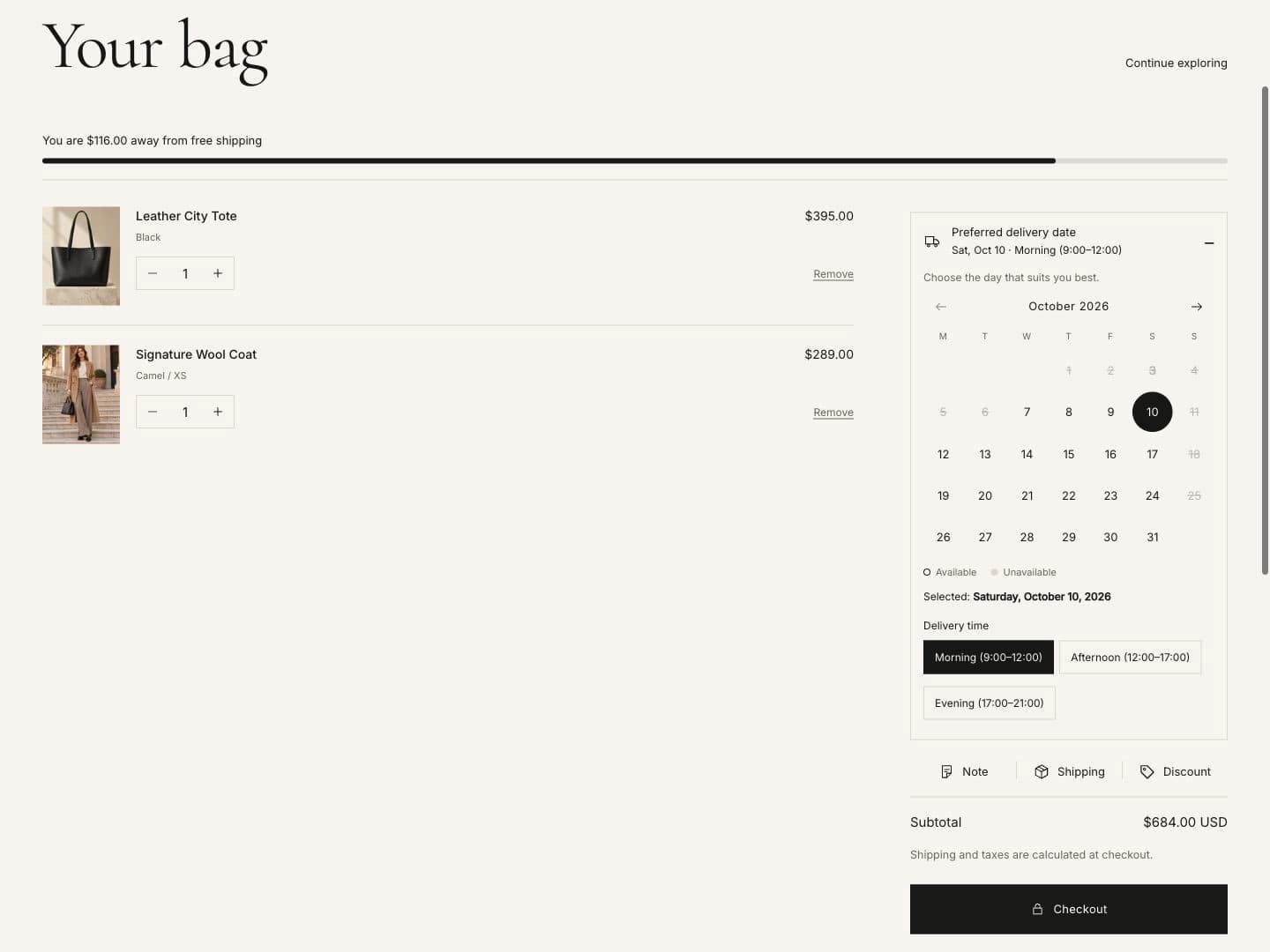
| Setting | What it does |
|---|---|
| Show in | Cart page and cart drawer, cart page only, or cart drawer only. |
| Require a date before checkout | Checkout stays disabled until a date is chosen. |
| Show the calendar expanded | When off, customers open the calendar from a compact row. |
| Pre-select the earliest available day | Saves the earliest day on the cart until the customer changes it. |
Texts and appearance
Icon, heading, text and a note under the calendar (for example “We will confirm the delivery date by email.”), an available / unavailable legend, and the first day of the week.
Which days are available
| Setting | What it does |
|---|---|
| Delivery weekdays | Tick the weekdays you deliver. |
| Earliest delivery after | Lead time in days before the first available date. |
| Count lead time in delivery days only | Skips days you do not deliver when counting the lead time. |
| Bookable up to | How many days ahead customers can choose. |
| Same-day cut-off hour and minutes | Orders after this time (store time zone) start one day later. Set the hour to 24 to turn off. |
| Unavailable dates | Holidays, as comma-separated dates 2026-12-25 or ranges 2026-12-31..2027-01-02. |
| Extra delivery dates | Dates you deliver even though the weekday is off, for example a Sunday before Christmas. |
Time windows
Enter windows separated by commas, for example Morning (9:00–12:00), Afternoon (12:00–17:00). Choose buttons or a
drop-down, set a heading, and decide whether a window is required.
When to show the calendar
| Setting | What it does |
|---|---|
| Minimum bag subtotal | Show only above this cart value (store currency). Leave empty to always show. |
| Only for countries | Two-letter country codes, for example US, CA. Uses the customer’s selected country. |
| Only when the bag contains a product tagged | Show only for carts with a product that has this tag. |
Carts with only gift cards or digital products never show the calendar.
On the order
| Setting | What it does |
|---|---|
| Order attribute name | The label shown next to the date on the order, for example Delivery date. |
| Time window attribute name | The label for the time window. |
| Date format on the order | For example 2026-10-07 (Wednesday) or Wednesday, October 7, 2026. |
You will find the date in the order under Additional details. Apps and order exports can read it as a cart attribute.